Unlocking Creative Potential: A Guide to the Hobby Objects Collection for Handmade Designs
In the vibrant world of digital design and crafting, the line between physical hobbies and digital creation is becoming increasingly blurred. Whether you are a professional graphic designer, a small business owner creating packaging, or a hobbyist looking to personalize invitations, having access to high-quality, versatile assets is crucial. This is where the Hobby Objects Collection steps in as an invaluable resource. This comprehensive pack allows creators to build unique, handmade-themed designs with ease, offering a bridge between traditional craft aesthetics and modern digital flexibility.
Understanding how to leverage such collections can transform your workflow, saving time while enhancing the visual appeal of your projects. Below, we explore what this collection offers, why it matters in contemporary design, and how you can use these elements to create stunning visuals across various mediums.
What Is the Hobby Objects Collection?
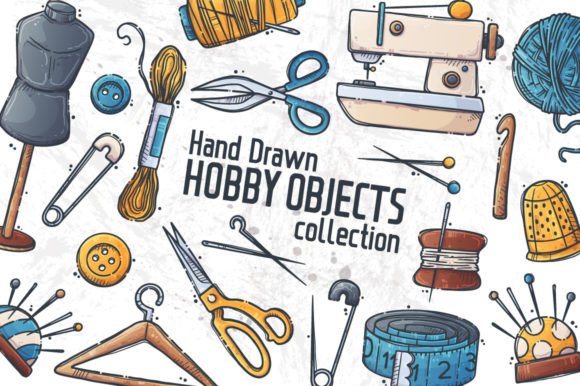
At its core, the Hobby Objects Collection is a curated set of digital assets designed to mimic the charm of handmade crafts. It includes isolated objects that represent creative accessories, consumables, and tools typically found in a hobbies workshop. Think of paintbrushes, spools of thread, scissors, glue bottles, sketchpads, and other artistic paraphernalia. These are not just static images; they are dynamic building blocks for your creativity.
The collection consists of 44 vector hand-drawn elements. The term "vector" is key here. Unlike standard raster images (like JPEGs) which can become pixelated when resized, vector graphics are based on mathematical paths. This means you can scale them up to the size of a billboard or down to a tiny icon without losing any quality. This scalability makes them incredibly versatile for different design needs.
Key Components of the Pack
When you acquire this digital product, you are receiving a multifaceted toolkit. Here is a breakdown of what is included:
- Vector Files: You receive 2 vector .EPS files and a shared .AI file. These formats are industry standards, compatible with major design software like Adobe Illustrator, CorelDRAW, and Inkscape.
- PNG Files: For those who prefer simpler workflows or do not use vector editing software, the pack includes 44 .PNG files. Each object is isolated on a transparent background, allowing you to drag and drop them directly into your projects.
- Customizability: Every element can be moved, recolored, and modified. This level of control ensures that the assets fit seamlessly into your specific color palette and design theme.
It is important to note that this is a digital product. Fonts and textures shown in preview images are not included in the download. This distinction helps manage expectations and encourages users to pair these objects with their own preferred typography and background textures.
The Significance of Handmade Aesthetics in Digital Design
Why do designers gravitate towards handmade-themed elements? In an era dominated by sleek, minimalist, and often cold corporate designs, there is a growing consumer appetite for warmth, authenticity, and human touch. This phenomenon is often referred to as the "artisanal revival."
Incorporating elements from the Hobby Objects Collection into your work adds a layer of personality and approachability. For businesses, this can translate to higher engagement. For individuals, it allows for deeper emotional connection in personal projects like wedding invitations or birthday cards. The imperfect, organic lines of hand-drawn vectors suggest care and effort, qualities that resonate strongly with audiences today.
Bridging the Gap Between Physical and Digital
One common misunderstanding is that digital assets lack the soul of physical materials. However, high-quality hand-drawn vectors capture the nuances of pencil strokes, ink bleeds, and paper textures. When used correctly, they can evoke the same feelings as a physical scrapbook or a painter’s studio. This collection serves as a digital toolbox that replicates the environment of a creative workshop, allowing you to "craft" digitally with the same freedom you would have physically.
Practical Applications: Where to Use These Elements
The versatility of the Hobby Objects Collection means it fits into a wide array of projects. Because each element is isolated and customizable, you are not limited to pre-made compositions. You can mix and match to suit your specific needs. Here are several practical examples of how these assets can be utilized:
- Greeting Cards and Invitations: Create bespoke designs for weddings, birthdays, or holidays. Use the paintbrushes and palettes for art-themed invites, or sewing tools for a cozy, homemade feel.
- Packaging and Wrapping Paper: Small businesses selling handmade goods can use these icons on their packaging labels, thank-you cards, or even as patterns for wrapping paper. This reinforces the brand identity of being artisanal and careful.
- Web Design and Social Media: Enhance blog posts, website headers, or Instagram stories with relevant icons. If you are writing a tutorial on knitting, adding a vector image of yarn and needles makes the content visually engaging and contextually relevant.
- Fabric and Apparel Design: Since the files are vectors, they can be scaled perfectly for print-on-demand services. You can create repeating patterns for t-shirts, tote bags, or home decor items.
- Stickers and Decals: The isolated PNGs are perfect for creating digital sticker packs for planners or physical stickers for journals and laptops.
How to Get Started with Your Own Designs
If you are new to using vector assets, the process might seem intimidating. However, the Hobby Objects Collection is designed to be user-friendly. Here is a simple guide to getting started:
Step 1: Choose Your Software. If you have Adobe Illustrator, open the .AI or .EPS file. If you use free software like Inkscape, these files are also compatible. For non-vector users, simply open the PNG folder.
Step 2: Select Your Elements. Browse through the 44 objects. Identify which tools or accessories fit the theme of your project. For example, if you are designing a back-to-school flyer, you might choose pencils, rulers, and notebooks.
Step 3: Customize and Arrange. Move the elements around your canvas. Change their colors to match your brand guidelines or personal preference. Because they are vectors, you can adjust the stroke weight or simplify the shapes if needed.
Step 4: Combine and Layer. Don’t be afraid to overlap objects. Place a paintbrush over a palette, or scatter sewing pins around a button. This layering creates depth and interest, making the design look more dynamic and less like a clip-art collage.
Maximizing Value for Creators and Businesses
From a business perspective, investing in a collection like this is cost-effective. Hiring an illustrator to draw dozens of custom icons can be expensive and time-consuming. This pack provides a ready-made library that saves hours of work. Furthermore, because you can modify the colors and arrangements, no two designs need to look the same. This ensures that your brand maintains a consistent aesthetic without becoming repetitive.
For educators and content creators, these visuals can help explain complex ideas. A diagram showing the tools needed for a specific hobby becomes much clearer with recognizable, high-quality icons. This enhances the learning experience for students or followers, making your content more authoritative and helpful.
Common Questions and Clarifications
Do I need advanced design skills?
Not necessarily. While vector software has a learning curve, the inclusion of PNG files means beginners can use these assets in simpler programs like Canva, Microsoft Word, or PowerPoint. The drag-and-drop nature of the PNGs makes them accessible to everyone.
Can I use these for commercial projects?
Typically, such collections allow for commercial use, but it is always wise to check the specific license agreement provided by the seller. Generally, these assets are intended to help you create end-products (like cards or shirts) that you can sell, rather than reselling the raw vector files themselves.
Are fonts included?
No. As stated in the product description, fonts and textures are not included. This allows you the freedom to choose typography that best suits your project without being locked into a specific style. It also keeps the file size manageable and the focus on the graphical elements.
Conclusion
The Hobby Objects Collection is more than just a set of clip art; it is a gateway to creating authentic, engaging, and personalized designs. By combining the flexibility of vector graphics with the charm of hand-drawn aesthetics, this pack empowers creators to produce professional-quality work efficiently. Whether you are designing packaging for your small business, creating heartfelt invitations, or adding visual interest to your web content, these 44 elements provide the building blocks you need.
Embrace the creative possibilities. Experiment with colors, layouts, and combinations. With this collection, you have the tools to bring your unique vision to life, blending the warmth of handmade crafts with the precision of digital design. Thank you for visiting our shop, and we hope these resources inspire you to create something wonderful. Have a nice day and happy designing!